This page holds the explanation in one place: what makes the work different, how a job runs from the first call to the last automation, what a twin is, what it runs on, and what a client receives.
What makes us different
What makes us different?
Most automation work starts with a tool and looks for somewhere to apply it. We start with a record of how your business runs and let the automation follow from it. The order matters, because software can only act reliably on facts it can read.
The record comes first
Before anything is automated, your customers, money, work, people and documents are held as records with a complete history. Each automation then acts on a record that has a name, a date and a source, and when it needs a person it can show that person the facts.
Your systems keep running
The twin mirrors your current systems and reconciles against them. Authority moves from an old system to the twin one table at a time, and only once the record shows the twin has been doing that job correctly. We do not rip anything out on day one.
A named person is accountable
Each automation has an owner. Anything irreversible, external or regulated stops for that person's approval with the facts assembled, and a sample of approved actions is reviewed afterwards, which keeps the approvals honest.
We are paid on measured results
The fee is a share of the improvement measured against a baseline agreed before install. If nothing improves, there is no fee. The mechanism is on the pricing page.
We do the setup work
Connecting your tools, obtaining the keys, deciding what is an app and what is a service, migrating the data safely and keeping the stack updated is the part of the job that stalls most businesses. It is the part we have made repeatable, and you keep the ability to build on and change anything we hand you.
The job lifecycle
How does a job run from start to finish?
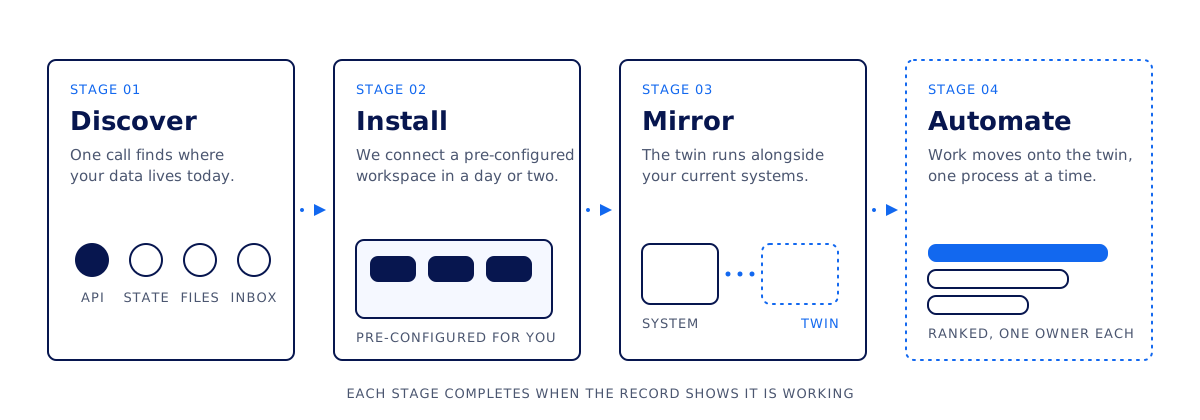
A job has four stages. We move to the next one when the record shows the current one is working, so the calendar depends on your business rather than on a plan written before we had seen it.
The four stages from left to right. The fourth is drawn dotted because that work is done by the twin.
Stage 1: discover
One call. We work out how your operation is recorded today, whether in systems with proper histories, systems that hold only the current state, periodic exports and spreadsheets, or mostly inboxes and messages. Any of those is a workable starting point. Which one it is decides how much hands-on work the twin will need, and the call also settles what a baseline would measure. You leave the call knowing both.
Stage 2: install
You do not start from a blank workspace. We bring one already configured for your kind of business, with the modules, the connections to your existing tools, and the keys and permissions in place, and we stand it up in a day or two. Your part is access: someone who can grant it and a short list of the tools you use.
Stage 3: mirror
Your current systems keep running while the twin mirrors them, reconciles against them and flags anything that drifts. This is where the record proves itself. Handing authority from an old system to the twin is a deliberate decision made one table at a time, with the reconciliation history in front of you.
Stage 4: automate
Automations are added in order of value, each with a named person accountable for it. Because the twin records how the business actually behaves, the next process to automate is chosen from that record. As the twin proves it can carry a process, the tools that only existed to carry it can go, and nothing is switched off until the record shows the twin has been doing the job correctly.
After the fourth stage
The twin keeps running and we keep your stack updated. Fees follow the measured improvement, the scope and terms in your portal record each change with its history, and new automations continue to be chosen from the record. The relationship ends when you say so, and your records stay in your own workspace.
What a twin is
What is a digital twin of a business?
A digital twin is a live, structured copy of how your business actually runs. Its customers, money, work, people and documents are held as governed records with a complete history, precise enough for software to act on and plain enough for you to check.
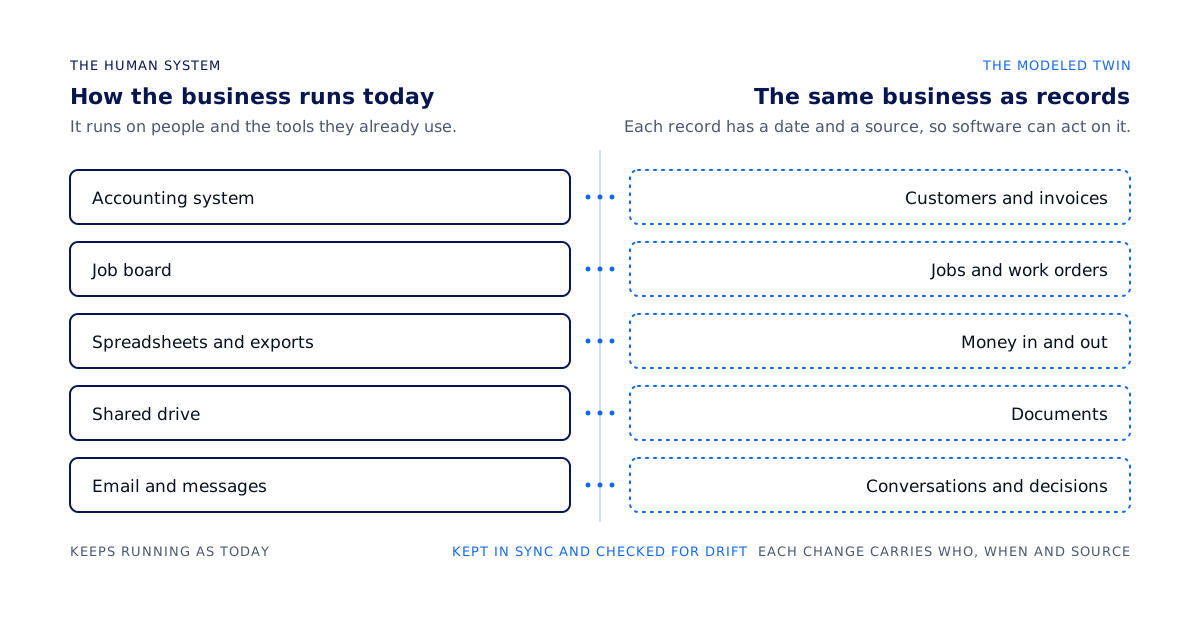
The human system on the left keeps running. The twin on the right holds the same facts as records.
What it holds
Customers and invoices, jobs and work orders, money in and out, documents, and the conversations and decisions around them, each as a typed record.
For each change, who made it, when, and from which source, kept as an append-only history.
The rules for who may see which record, written once and compiled into the database itself.
What it does with them
The twin mirrors your systems and reconciles against them, so it stays a live model as they change. Software acts on the records, and where a script can do the work, a script does it. When a soft judgment is needed, an AI model makes that one call and nothing more. Anything irreversible, external or regulated stops for a person's approval with the facts attached.
Where it stops
The twin does not switch a system off on its own, and it does not act on a guess. A stage completes when the record shows it working, and a write that would change something outside the twin goes through a checked workflow and, where it matters, a person. The home page has the same definition alongside the safety, speed and accountability diagrams.
The platform underneath
What does the twin run on?
The twin runs on an application platform built for governed operations. We describe it here by its mechanism and do not name it on this site, because none of the work depends on knowing the vendor.
Services. Each part of the business is one service: customers and relationships, the financial ledger, money movement, people, sales, operations, assets, procurement, communications and documents. You install only the ones you need, and each owns its records and the procedures to read and change them.
Apps. The screens your team uses on top of the services. You can build more of them, and so can a developer on your behalf.
Workflows. Automations built from a small, closed set of step types and validated before they are allowed to run. Steps that are irreversible, external or regulated stop for a named person's approval.
Governed records. Typed rows that carry who, when and source on each change. Who may see which record is compiled into the database as row-level rules, so a query cannot read across a boundary it was not granted.
Developers can read how a workspace is structured, how access works and what a request looks like on the For developers page.
What clients receive
What does a client receive?
A workspace of your own. The twin's records live in it, behind access rules compiled into the database, and they stay there when the engagement ends. Keys into it are issued per integration and can be revoked from your portal.
The twin, running alongside your systems. Mirrored, reconciled and checked for drift, with each change carrying who, when and source.
Automations with a named owner. Added in order of value, each validated before it runs, each stopping for a person where it matters.
A private portal. Secure communication in one thread, document upload with a receipt for each file, a personal chat agent that organizes your requests and routes them to us, the work in progress and its measured results, and the current scope and compensation terms with each revision kept.
The weekly newsletter. Updates on your own work and metrics plus industry news for your sector, subscribed from inside the portal.
The terms in writing. The baseline, the share and the settlement terms are held in the portal as structured fields with an append-only history, so both sides can see what was agreed and when it changed.