A twin is a workspace of services, apps, workflows and governed records. This page explains how it is structured, how access works, and what a request looks like. The public API reference is not yet available, and code samples on this page are illustrative only.
Status of this documentation
The workspace API is not yet public. This page introduces the model; the samples are illustrative and are not an integration reference. Endpoint details, limits and an OpenAPI document will follow. To discuss developer access, start a conversation.
The model
What does a workspace contain?
A workspace contains four kinds of thing, and automations are composed from them.
Services. There is one per business area (customers and relationships, the financial ledger, money movement, people, sales, operations, assets, procurement, communications, documents), and a client installs only the ones they need. Each service owns its records and exposes procedures to read and change them.
Apps. These are the screens a team uses on top of the services. Clients can build more of them, and so can you on their behalf.
Workflows. These are automations built from a small, closed set of step types. They are validated before they are allowed to run, and steps that are irreversible, external or regulated stop for a named person's approval.
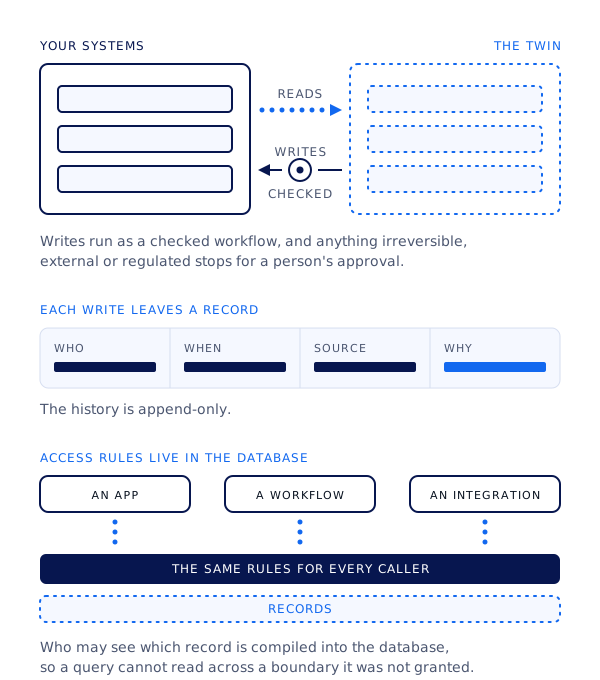
Governed records. These are typed rows that carry who, when and source on each change, with an append-only history. Who may see which record is compiled into the database as row-level rules, so a query cannot read across a boundary it was not granted.
Where the records live
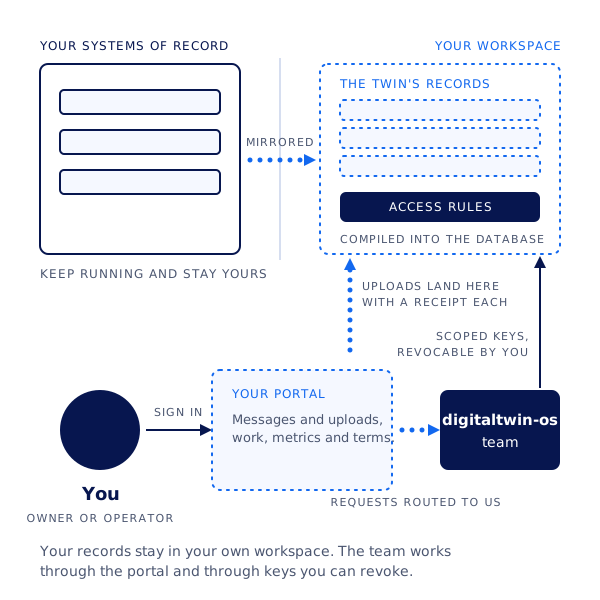
The client's systems of record keep running and are mirrored into the client's workspace, where the twin's records sit behind rules compiled into the database. The portal is the client's channel to the team, and keys into the workspace are issued per integration and can be revoked from the portal.
The platform underneath is not named on this site. The description above is the shape you will work with, and none of it depends on knowing the vendor.
Quickstart
How do I make a first request?
Ask the client (or us, from the portal) to issue you a workspace key with the scopes your integration needs. Keys are issued per workspace and per integration; there is no global developer key.
Confirm the base URL for the client's workspace. The base URL will be supplied with approved access.
Call the health procedure to verify the key and its scopes. The health check will be documented when access is available.
List a service's records with a small page size first, inspect the field types and the provenance fields, then plan your writes against them.
# Placeholder: base URL, path and procedure names are not yet published.
curl -s "https://WORKSPACE_BASE_URL/api/health" \
  -H "Authorization: Bearer WORKSPACE_KEY"
Authentication
How does access work?
Access is scoped. A key names the workspace it belongs to and the scopes it was granted, and each scope maps to a service and to read or write permission on its records. The scopes are compiled into the database as row-level rules, so the same boundary applies whether a request arrives from an app, a workflow or your integration.
Keys are issued by the client's workspace owner or by us on their instruction, and can be revoked from the portal at any time.
Each write carries the key's identity as its source, so the record of who changed what includes integrations.
Writes that would trigger an irreversible, external or regulated action are queued for a person's approval, and your request returns with a pending status.
Reads, writes and access rules
The twin reads from the client's systems and writes through a validated workflow that stops for a person's approval where it matters. Each write carries who, when, source and why, and the row-level rules apply to an app, a workflow and your integration alike.
Authentication details will be supplied with the published API reference.
Sample request
What does a request and response look like?
This is an illustrative read of one service's records. The field names are examples of the record shape (typed fields plus provenance) and are not yet published endpoint contracts.
# Placeholder: procedure path and query parameters, to confirm.
GET /api/services/customers/records?limit=2
Authorization: Bearer WORKSPACE_KEY
Limits are set per workspace and per key. The shape of the policy is fixed, and the values are being confirmed.
Limit
Applies to
Value
Requests per minute
Each key
Not published
Page size
List procedures
Not published
Payload size
Write procedures and uploads
Not published
Pending approvals
Writes that need a person
Returned as pending; no retry needed
Errors and versioning
How are errors and versions reported?
Errors come back as a JSON object with a stable machine-readable code, a human-readable message, and the id of the request, so a failed call can be traced in the workspace's own record. Writes that stop for a person's approval return a pending state and are not reported as errors.
# Placeholder: exact field names and the list of codes, to confirm.
{ "error": { "code": "scope_denied", "message": "Key lacks write access to customers", "request_id": "req_PLACEHOLDER" } }
The versioning policy, deprecation windows and the OpenAPI download will be listed here.
Status
Where do I check availability?
Each client's workspace is kept updated by us, and incidents are reported to the client in their portal. A public status page for the platform is planned.
Changelog
What has changed on this page?
2026-09-07 Overview of the workspace model published. Integration reference is not yet available.
Questions from developers go through the client's portal chat agent, or start with a conversation.